Solution
Because this is a system logged in with a Microsoft account, when using Remote Desktop login, it defaults to using the Microsoft account’s email address as the username. The system recommends enabling PIN code login.
Referring to information found online, the first step is to disable security settings, specifically the To improve security, only allow this device to use Windows Hello sign-in (recommended) option within the Sign-in Settings. Disable it.
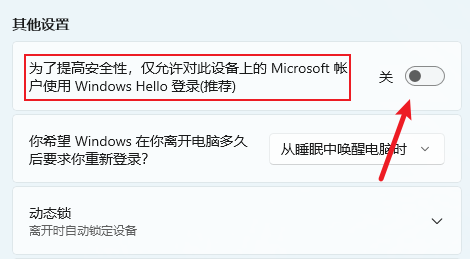
The key second step is to restart the system. At this point, you will see the login interface with PIN code login removed and an additional Microsoft Account option. Select account login and manually enter your username and password. Now, when attempting remote desktop login again, it works normally.
References
https://learn.microsoft.com/zh-cn/answers/questions/2191955/question-2191955
Comments will load when you scroll here.